
An observability console that speaks PromQL, LogQL and TraceQL — and answers back.
Eagle is the Obstack Stack's own console, and it is running today. Workloads, infrastructure, the service map, logs, traces and AI spans, read straight from the store in its own query languages. Ask Eagle answers from that same telemetry, TypeScript functions run beside it on an edge runtime, and EagleSRE brings incidents into the same place.
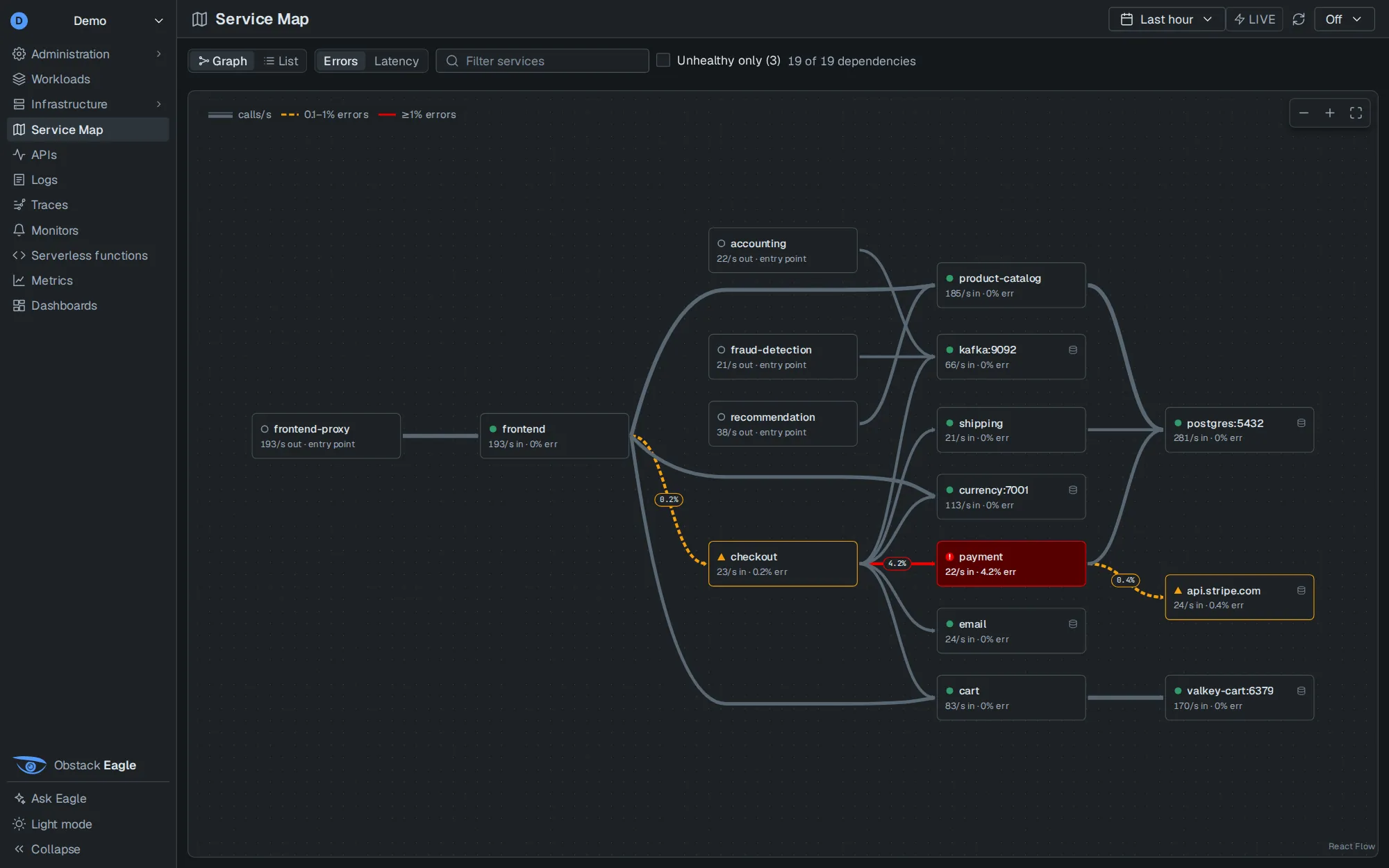
In the order an investigation runs.
Eagle's sections follow the questions you ask during an incident, not the teams that own the data. A service keeps the same name on the map, in its logs and in its traces, so moving between them keeps your place.
- What is runningWorkloads, Hosts, Docker Swarm and Kubernetes: every service and the machine it runs on.
- How it connectsA Service Map drawn from traces, and APIs: every service broken down by endpoint.
- What it emittedLogs, Traces and AI Observability, searched with one syntax. A trace id in a log line opens its trace.
- How you watch itMonitors, Metrics and Dashboards over the same labels as everything else.
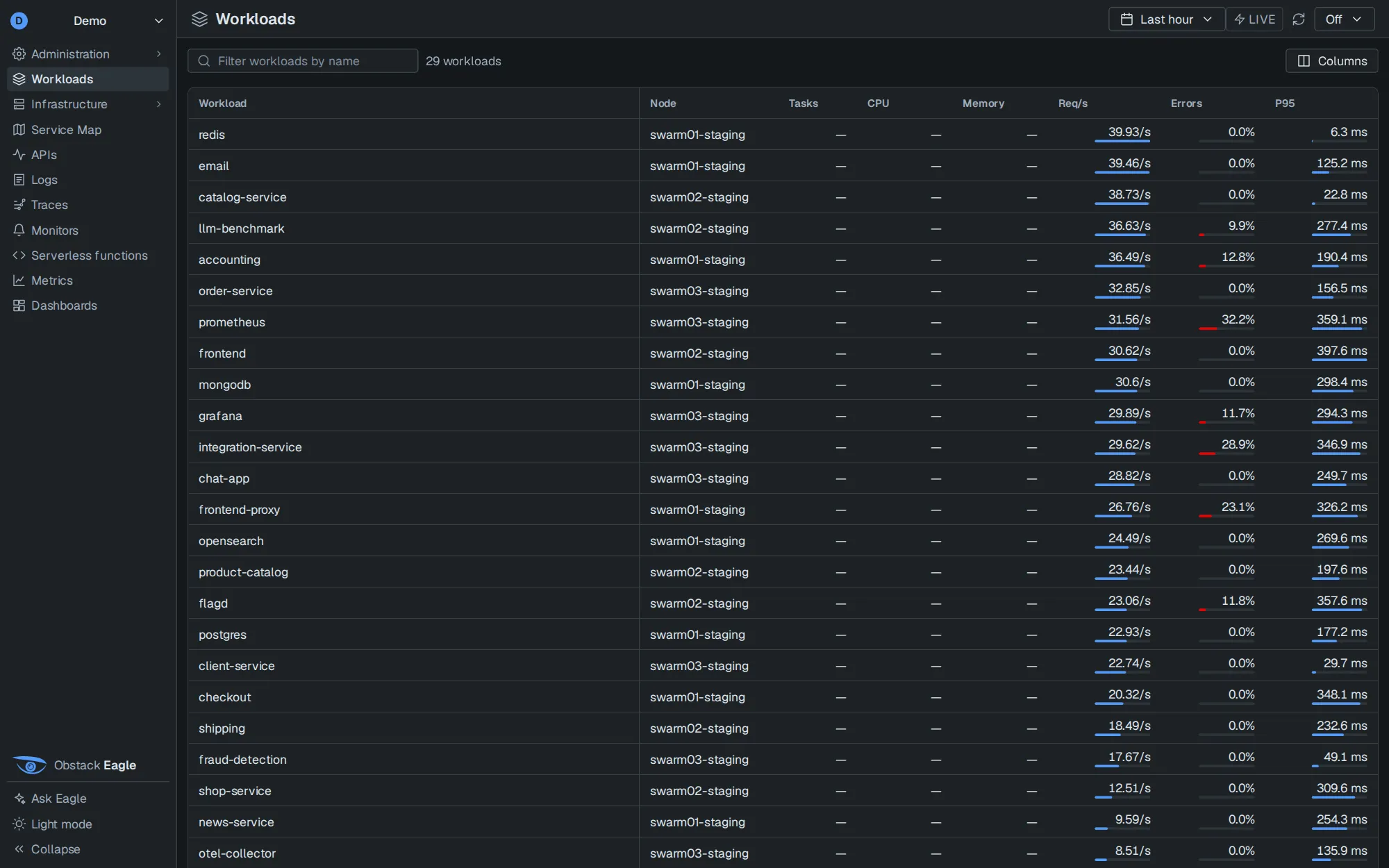
Every running service, in one list.
The node it runs on, its CPU and memory, requests per second, error rate and p95, with bars you can read at a glance.
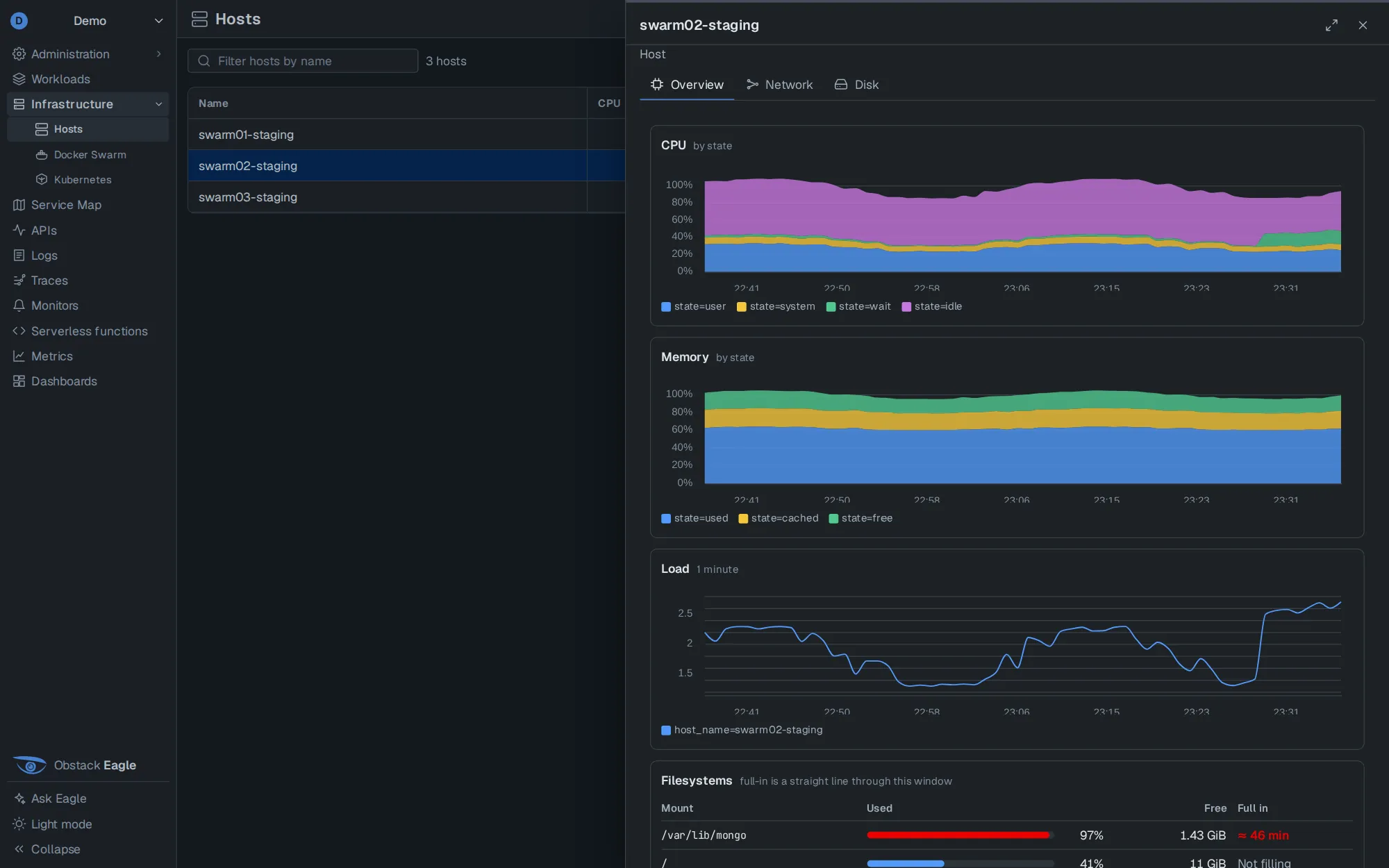
A host, measured or marked not measured.
CPU and memory by state, load, network and disk, and filesystems with a straight-line fill forecast. A metric the collector does not send says so, instead of drawing a zero.
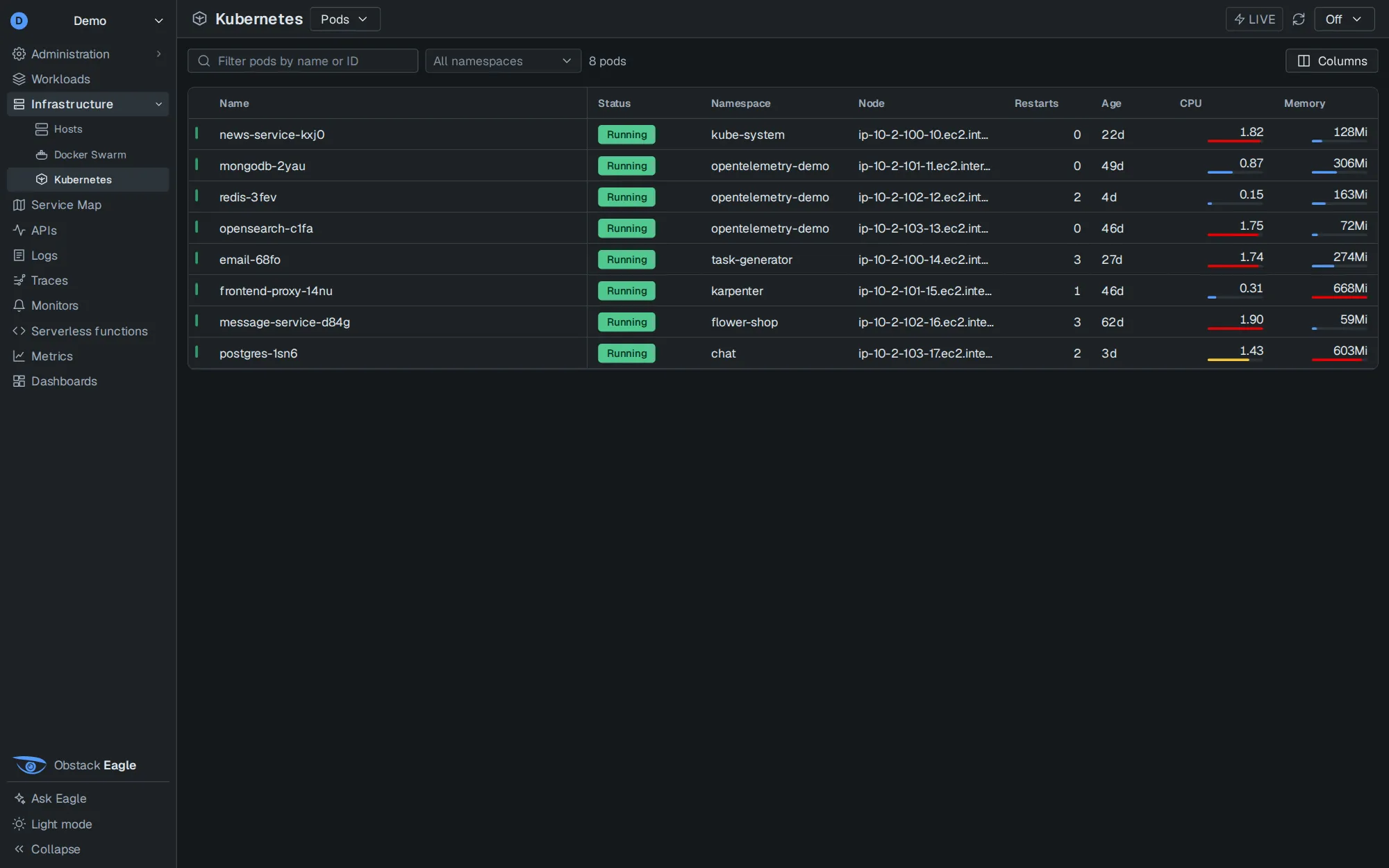
Pods, nodes and restarts.
Every pod with its namespace, node, restarts, age, CPU and memory. Docker Swarm services get the same view.
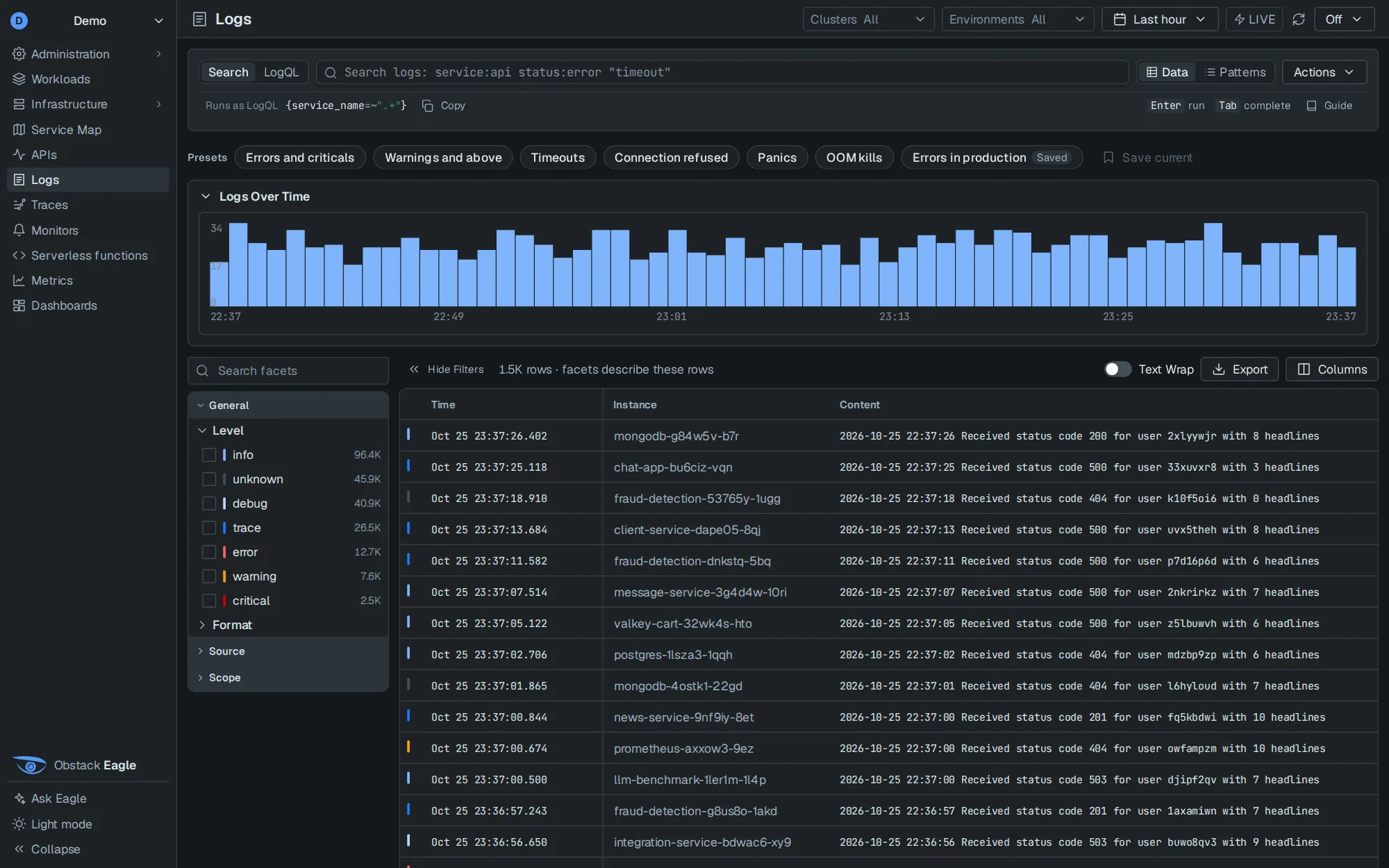
Logs with facets that add up.
A volume histogram, presets and saved queries, facets whose counts add up to the rows, and a patterns view. Every search shows the LogQL it runs.
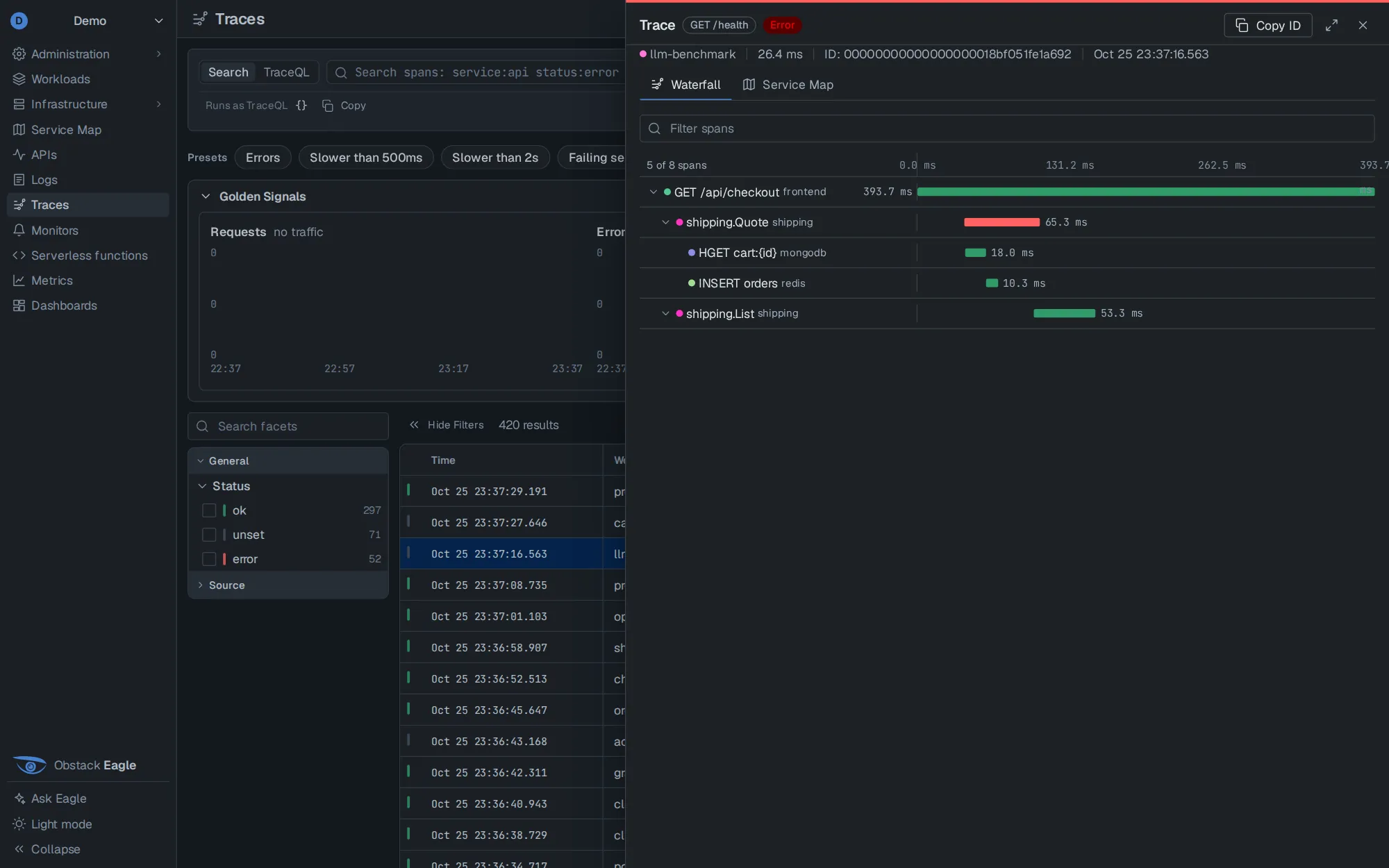
Spans, traces and the waterfall.
Golden signals over whatever the search matched, then a waterfall for each trace in a drawer that lives in the URL. A trace id in a log line opens here.
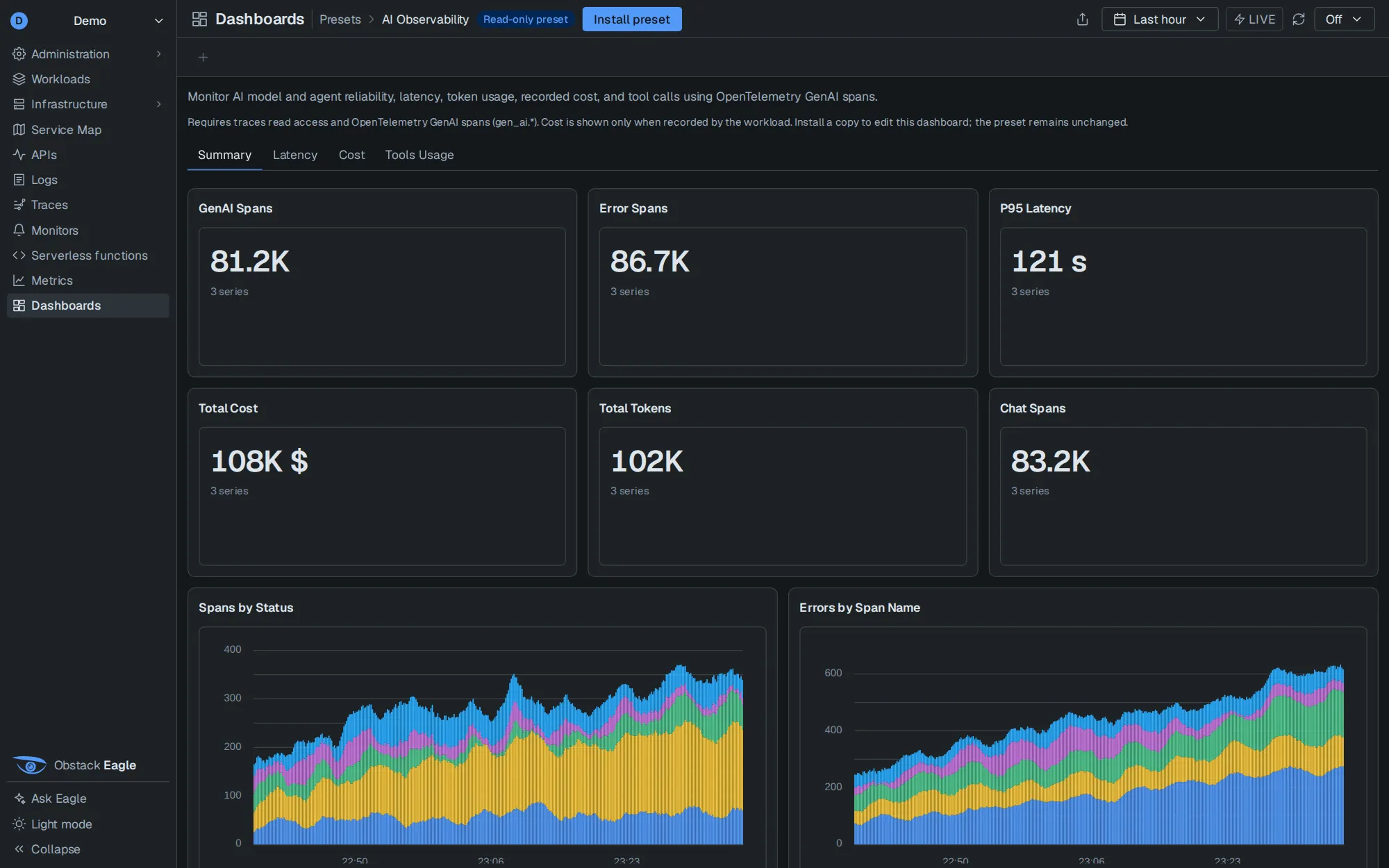
Your own LLM traffic, as spans.
OpenTelemetry GenAI spans: tokens, recorded cost, tool calls and models, next to latency and errors. It installs as a dashboard preset you can then edit.
Type the search. Read the query it runs.
Eagle compiles one search syntax to LogQL, TraceQL or PromQL and prints the result under the bar. Switch to the native query whenever you want, and back. Structured fields such as level become pipeline filters, not stream selectors, so a search never quietly matches nothing.
{service_name="checkout"} |= "timeout" | level="error"{ resource.service.name = "checkout" && status = error && duration > 500ms }avg by (route) (http_server_duration{service_name="checkout"})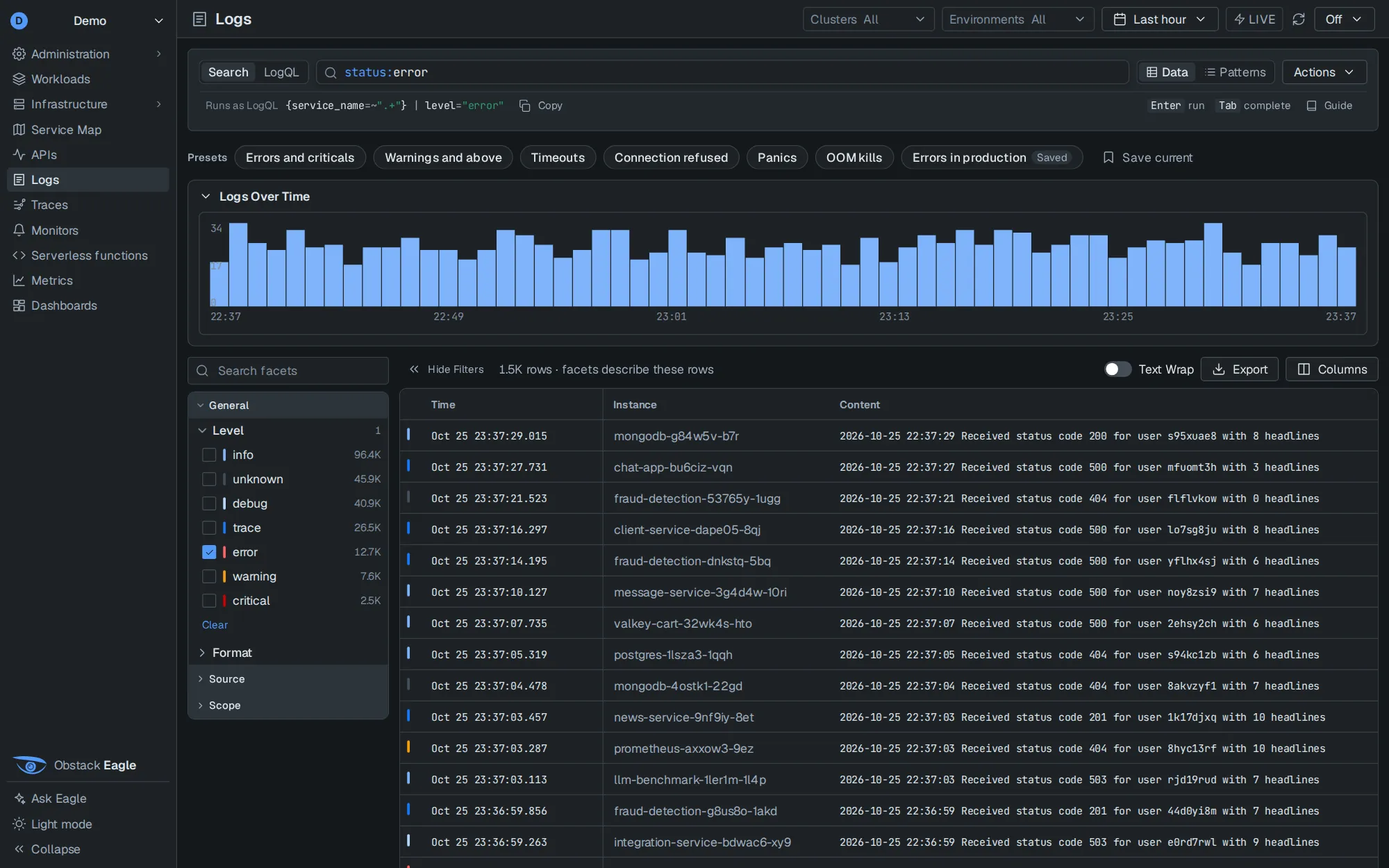
An assistant that answers from your telemetry, with its working shown.
Ask Eagle sits in the rail on every page, and ⌘J opens it anywhere. It knows the section you are on, the query in the bar and the time range, and it answers by running the queries the pages run.
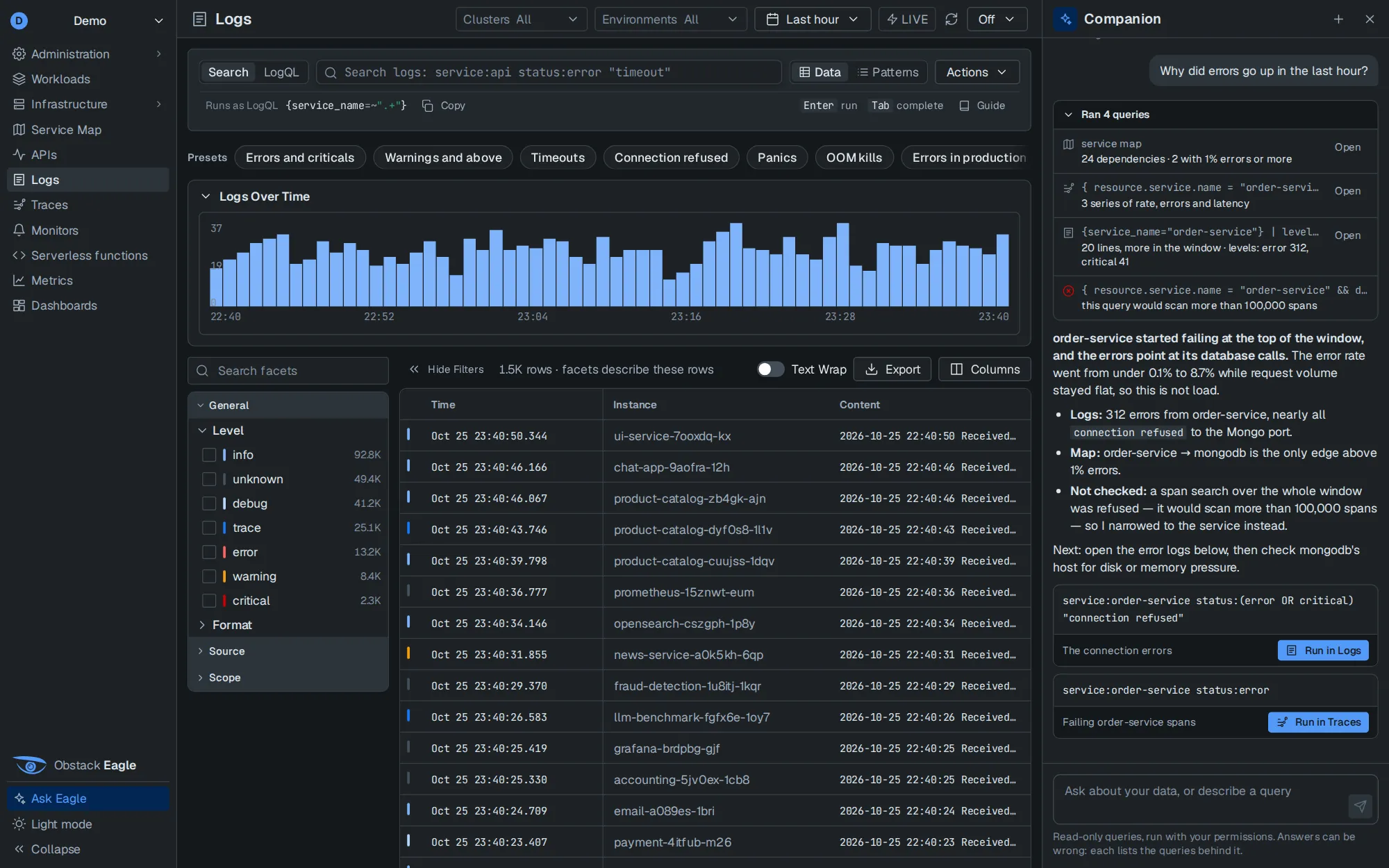
- You askIn plain words, or by describing the query you want written.
- The model picks a toolsearch_logssearch_tracestrace_golden_signalsquery_metricsservice_maplist_workloadslist_hostshost_detailsget_tracesuggest_query
- Eagle runs it, as youThe same read-only query the page would make, with your permissions, in one of your tenant's query slots. The model never touches the store.
- Eagle does the arithmeticCounts, extremes and when a peak happened are computed by Eagle and handed back. Missing data comes back as “not measured”, never as zero.
- You get an answer you can checkEvery query listed and openable on its page; suggested queries come back as buttons. Up to 8 tool rounds a turn, then the tools are withdrawn and it must answer.
Ask Eagle, on every page
Root causes, where a piece of data lives, or the query you could not quite write. It docks beside the page on a desktop and opens as a sheet on a phone.
In the function editor
Explain, test or debug a function. It sees your unsaved files and manifest; a proposed change opens as a diff and reaches the editor only when you apply it. Commit and deploy stay yours.
In EagleSRE
An investigation agent built on LangGraph runs as a Serverless function and checkpoints every step. Ask Eagle can read incident records, but never starts or changes one.
AI Observability
Watch your own AI features: OpenTelemetry GenAI spans with tokens, recorded cost, tool calls and models, next to their latency and errors.
Your model, on your network.
Eagle is included in every stack plan; model-provider usage and inference hosting are separate. Point Eagle at any OpenAI-compatible Chat Completions endpoint with tool calls: Netter's router, a hosted provider, or a model you run yourself. The browser never talks to the model; Eagle does, from the server, and renders its answers as text, never as HTML.
# eagle.env
COMPANION_URL=https://llm.internal.example
COMPANION_API_KEY=…
COMPANION_MODEL=switchyard
COMPANION_MAX_ROUNDS=8Functions that run next to your telemetry.
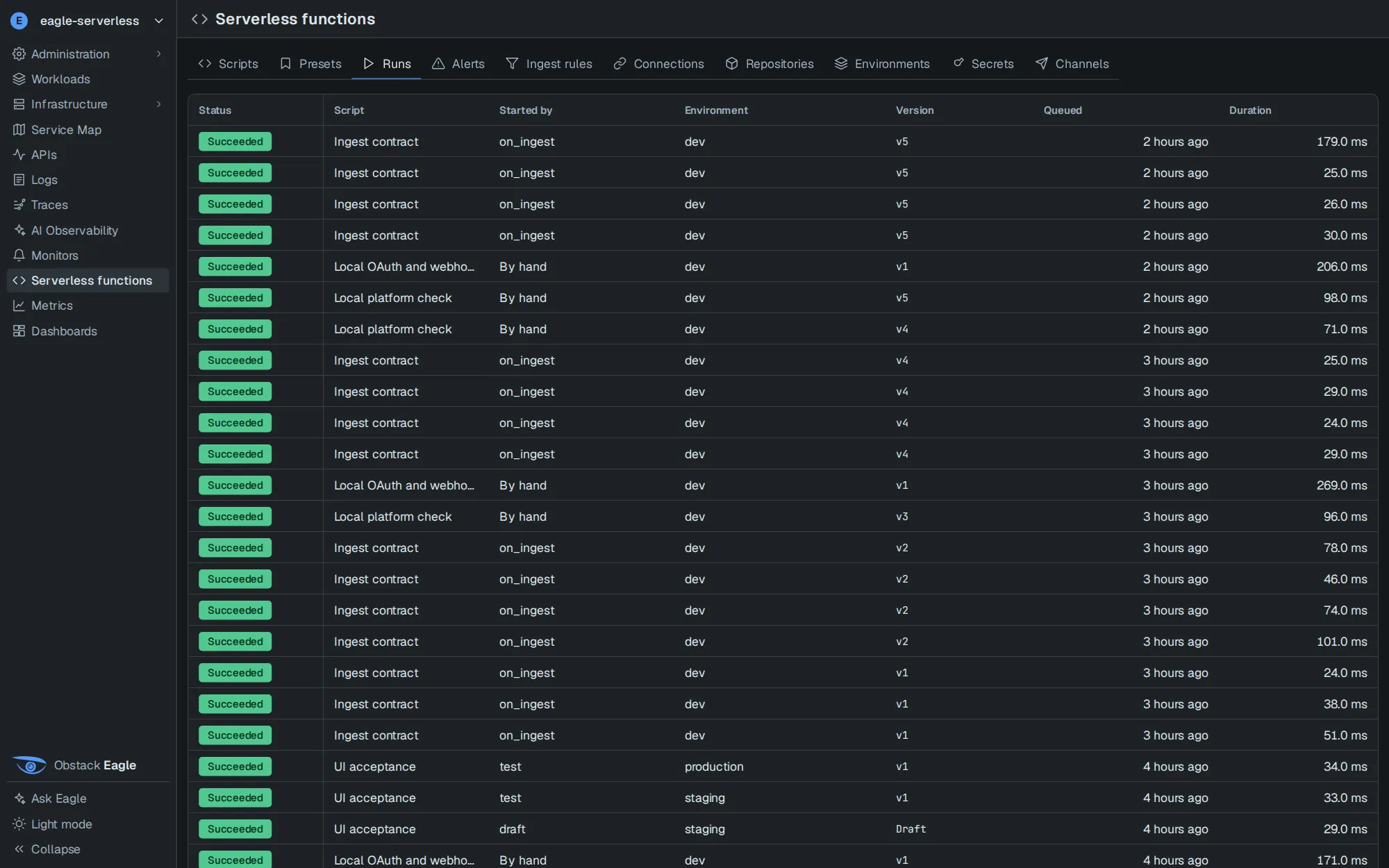
Write TypeScript, commit it to git, and Eagle builds it into an immutable artifact. Every run gets its own isolated worker on Edge Runtime and is gone when it finishes. Functions read signals, write metrics, raise and resolve alerts, and react to telemetry as it arrives.
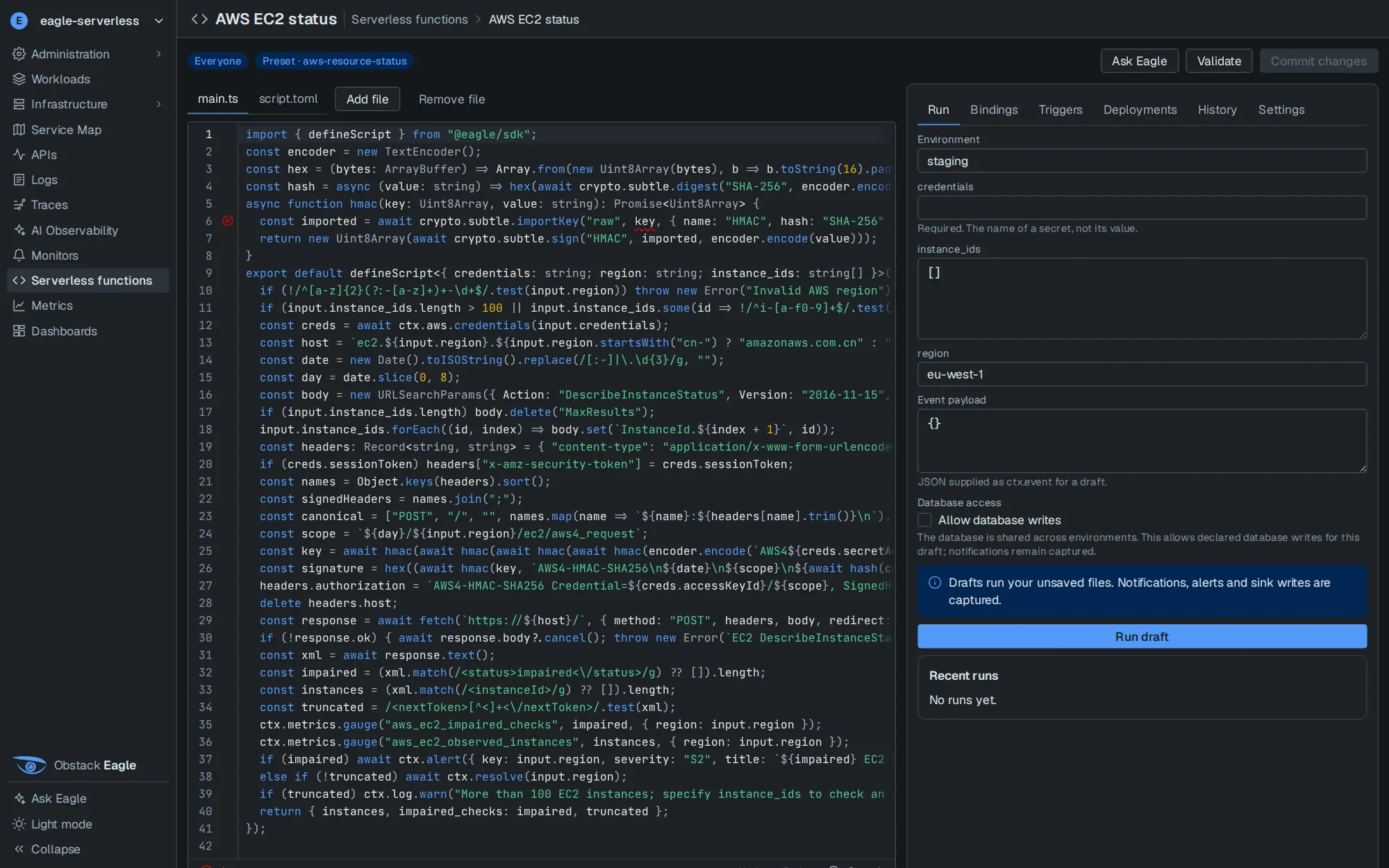
From commit to production, every step recorded.
- CommitTo a Forgejo repository Eagle creates for you, or to your own Git.
- BuildType-checked with Deno and bundled to an eszip. Errors land in the editor's gutter.
- VersionImmutable, numbered, deduplicated by source digest.
- StagingNotifications and sink writes are captured, so nothing real is touched.
- TestThe version's own tests, with their results kept beside it.
- ProductionPromotion gated on tests and approvals. Roll back to any built version without a rebuild.
A whole function.
presets/http-check · main.tsimport { defineScript } from "@eagle/sdk"; export default defineScript<{ url: string; expected_status: number; timeout_ms: number }>( async (ctx, input) => { const started = performance.now(); const url = new URL(input.url); const response = await fetch(url, { redirect: "manual", signal: AbortSignal.timeout(input.timeout_ms) }); await response.body?.cancel(); const ok = response.status === input.expected_status; ctx.metrics.gauge("http_check_latency_ms", performance.now() - started, { target: url.origin }); ctx.metrics.gauge("http_check_success", Number(ok), { target: url.origin }); if (ok) await ctx.resolve(url.origin); else await ctx.alert({ key: url.origin, severity: "S2", title: `HTTP check answered ${response.status}` }); return { ok, status: response.status }; });
# script.toml
name = "HTTP check"
[run]
timeout = "30s"
[[triggers]]
every = "5m"
Six ways to start a run.
Every five minutes, or a cron line. Fires exactly once across replicas.
A query over your telemetry, evaluated against history through Piper.
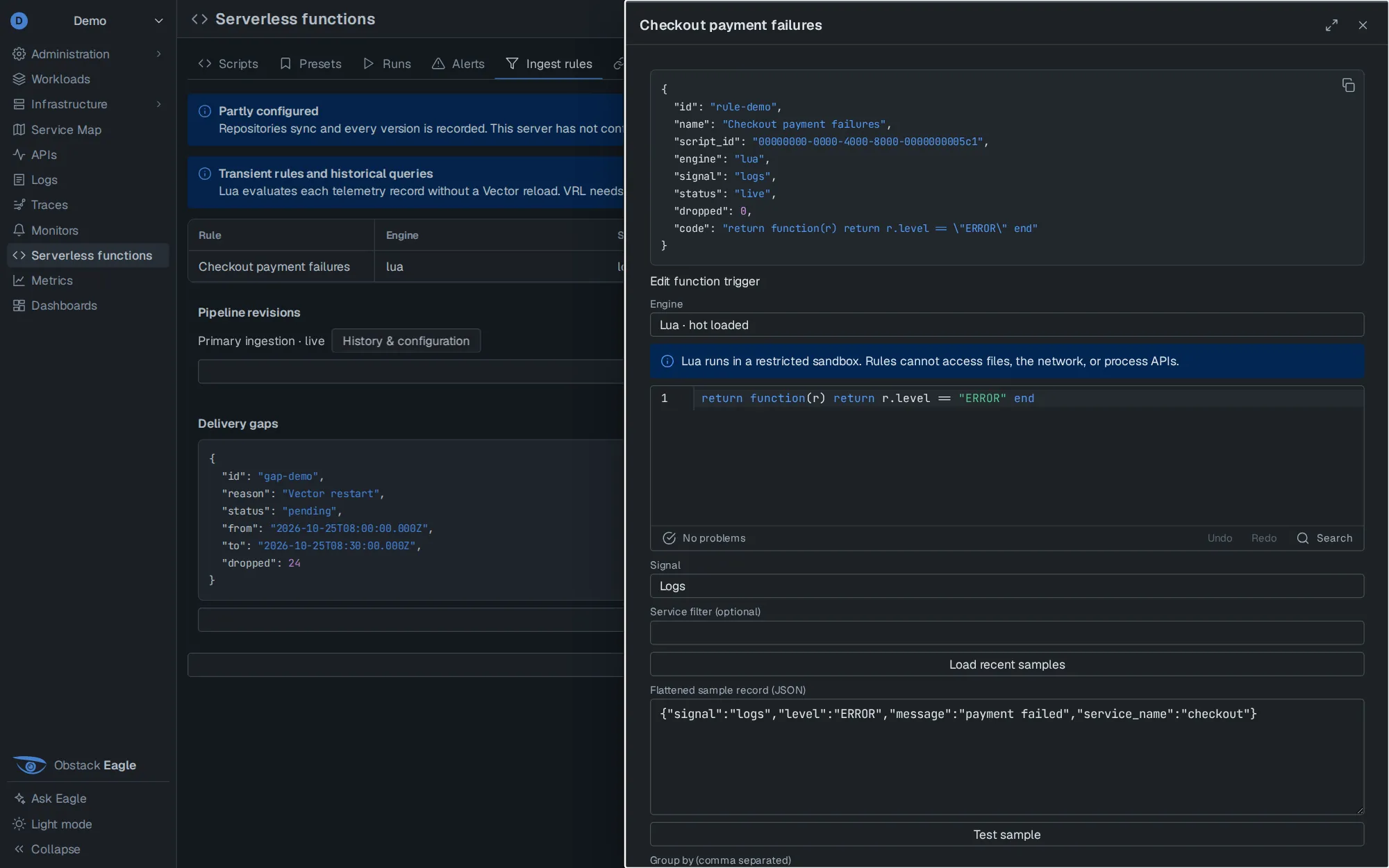
A Lua predicate inside Vector, sandboxed and hot-loaded, sees each record as it arrives.
A bearer token per deployment, shown once and rotated from the console.
Topics that other functions and external publishers write to.
Run now, with a form generated from the manifest's inputs.
One worker per run
Edge Runtime in oneshot mode: non-root, read-only root filesystem, and a run's timers die with it.
Secrets stay in Vault
OpenBao or Vault holds the values; Git and Postgres hold only names. Resolved secrets are redacted from every run's output.
No path inward
Workers reach Eagle's broker, the artifact store and the public internet. Private ranges, metadata endpoints and your databases are firewalled off.
Builds that work air-gapped
A pinned runtime, offline dependency packs and prebuilt preset archives: a build never reaches for a registry.
Incident response, where the evidence already is.
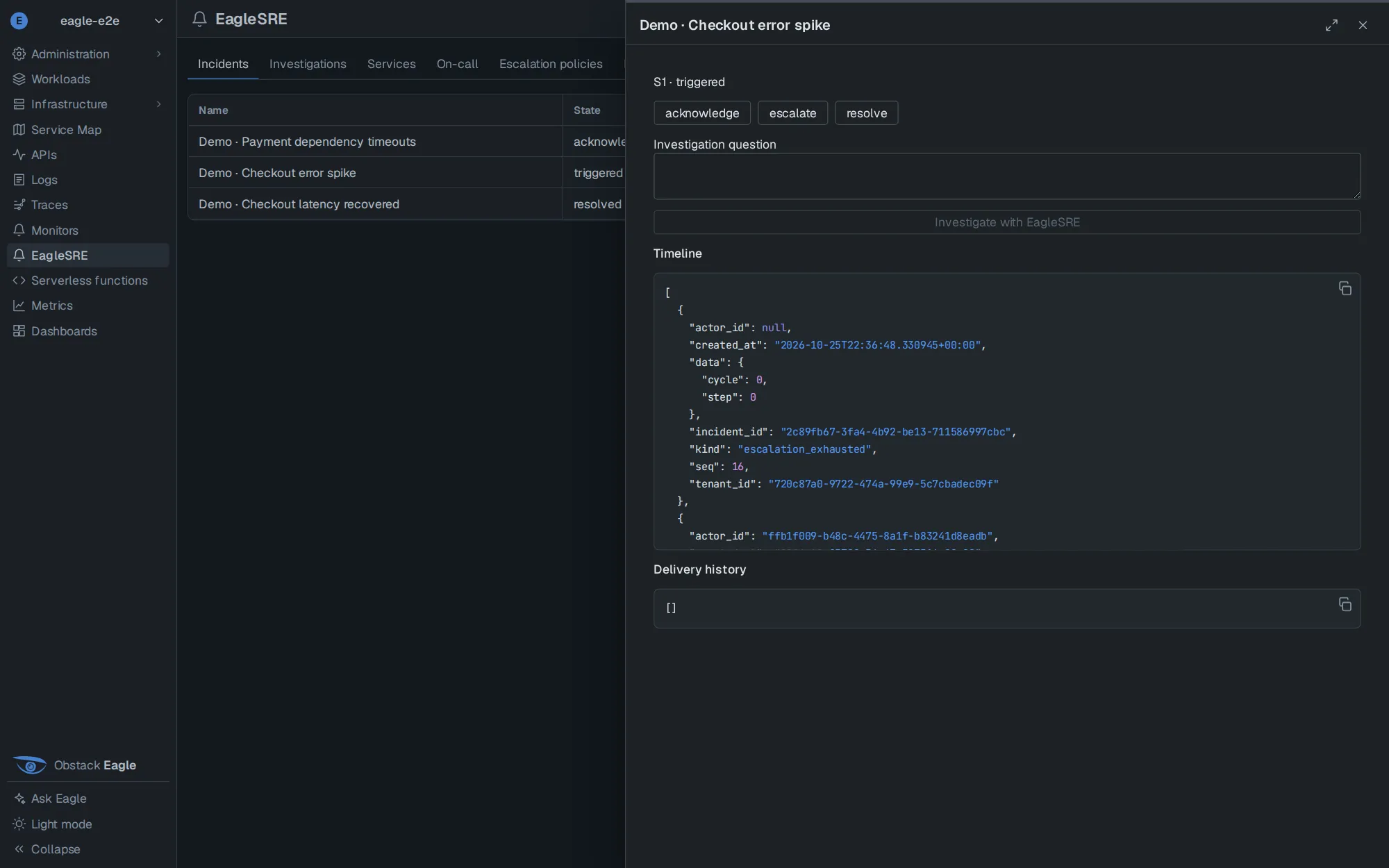
EagleSRE is an optional service beside Eagle. Alerts become incidents with severity, escalation and on-call; responders work them from Eagle, Slack or Microsoft Teams. Eagle stays the identity provider: no second user database, no second login.
- Alert inEagle monitors and query triggers, Prometheus Alertmanager, or any webhook with its own token.
- IncidentMapped to a service, a severity and an escalation policy. Every action carries the version you saw, so a stale click is refused.
- NotifySlack, Teams, email, Pushover or Twilio, along schedules and escalation steps.
- InvestigateYou ask the question; the agent gathers evidence with approved read-only queries and checkpoints each step.
- LearnFollow-ups, postmortems, SLO definitions and status updates, alongside the incident.
/eaglesre declare S1 Checkout failures
/eaglesre incidents
/eaglesre ack <incident>
/eaglesre investigate <incident> Compare the error spike with recent changes
/eaglesre catchup <incident>
A change typed in chat comes back with a confirm button bound to the incident's revision. Answers that contain queried data are sent to you privately.
From requirements to monitors.
Write down what must stay true. A planner drafts monitors as Serverless functions and tests them, then waits: only a person can approve one, from the web, against the exact revision that passed.
One identity, short-lived credentials.
Eagle issues two-minute, audience-bound credentials to EagleSRE, and every change is checked against your current permissions in Eagle.
Preview. Incidents, escalation workers, the Slack and Teams adapters and the investigation agent are built; delivery through each provider is in acceptance testing. It is not yet a replacement for a production pager. Explore EagleSRE or contact us to scope an evaluation.
Nine sections, one set of labels.
Everything below is in the console today, reading the same store as Grafana.
Workloads
Every running service in one list, with the node it runs on, its CPU and memory, requests per second, errors and p95.
Infrastructure
Hosts, Docker Swarm and Kubernetes. A host opens on CPU, memory, filesystems with a fill forecast, disk and network, and says "not measured" instead of drawing a zero.
Service Map
Who calls whom, drawn from traces. Every service shows its call rate and error rate; colour the map by errors or by latency, or read it as a list.
APIs
Each service by endpoint: latency percentiles, errors by span name and spans by status.
Logs
Search, presets and saved queries over a volume histogram, with counted facets and a patterns view.
Traces
Spans or whole traces, golden signals over whatever the search matched, and a waterfall for each trace.
AI Observability
GenAI spans: tokens, cost, tool calls and models, with latency and errors beside them, as an installable dashboard preset.
Monitors
Conditions with a severity. Each shows when it was last evaluated; open issues show when they last changed.
Metrics and dashboards
Metrics in PromQL or the search syntax. Dashboards per tenant, with panel tabs and presets you can install and then edit.
Built in
The things you only notice when they are missing.
- One identity across several tenants: OIDC or Active Directory / LDAP sign-in, groups, roles and an audit log.
- Every query bound to the tenant that made it, and API keys per tenant.
- Every page works from a 320-pixel phone to a wall display, with a mouse or a finger. A test sweeps each route across that range.
- Details open in drawers that live in the URL, so the link you paste opens what you were looking at.
- Light and dark themes. The dark one is the default.
- One telemetry store behind it, GreptimeDB or ClickHouse, read through Piper.
Where Eagle differs from the consoles teams weigh it against.
Four questions that decide how a console feels in use: where it runs, what you type, where you start, and who answers when you ask.
| Capability | Eagle | Grafana | Datadog | groundcover | SigNoz |
|---|---|---|---|---|---|
| Where it runs | Your servers or Obstack Cloud. Runs air-gapped, assistant included. | Self-managed, or Grafana Cloud. | Datadog's cloud. | Bring your own cloud: the data plane sits in your cloud account. | Self-hosted open source, or SigNoz Cloud. |
| What you type | One search syntax, compiled to PromQL, LogQL or TraceQL and shown under the bar. Native queries any time. | Each data source's own language, with query builders. | Datadog's own search and query syntax. | gcQL for logs, traces and events; PromQL for metrics. | A query builder, ClickHouse SQL, and PromQL for metrics. |
| Where you start | Sections in investigation order, from workloads to dashboards. Details open in drawers that live in the URL. | Dashboards, and Explore for ad-hoc queries. | A product area per signal: APM, Logs, Infrastructure and more. | Kubernetes workloads and the signals around them. | Services, traces, logs and dashboards. |
| The assistant | Ask Eagle, with every query it ran listed. Any OpenAI-compatible model, including one you host. | Grafana Assistant. Self-managed installs connect a Grafana Cloud stack; in public preview there. | Bits AI, in Datadog's cloud. | Agent Mode, running in your cloud. | Noz, on SigNoz Cloud. |
Swipe the table sideways to reach every column.
Grafana stays.
In every plan, with unlimited users and the Grafana MCP server for agents. Both read the same store, so choosing one costs nothing in the other.
Eagle follows the incident.
Keep the dashboards you have. Open Eagle when you want to go from a service to its log line, ask a question of the data, or run code against it.
Eagle is Piper's client, and its identity service.
Piper serves one store as PromQL, LogQL and TraceQL and holds no user records. On every query it asks Eagle what the credential is, which decides the tenant, the database and the signals that may be read. Eagle starts first and needs no Piper to become healthy.
Swipe the diagram sideways to see all of it.
Eagle is in the Obstack Stack today.
Explore EagleMCP for assistant access to the stack.
Install the self-hosted Max demo with our Helm chart and a 30-day evaluation license. Run your own telemetry through Eagle and Grafana, then activate Go, Pro or Max on the same installation.